
Edited by Tejas Telkar · Published · Updated
Short answer
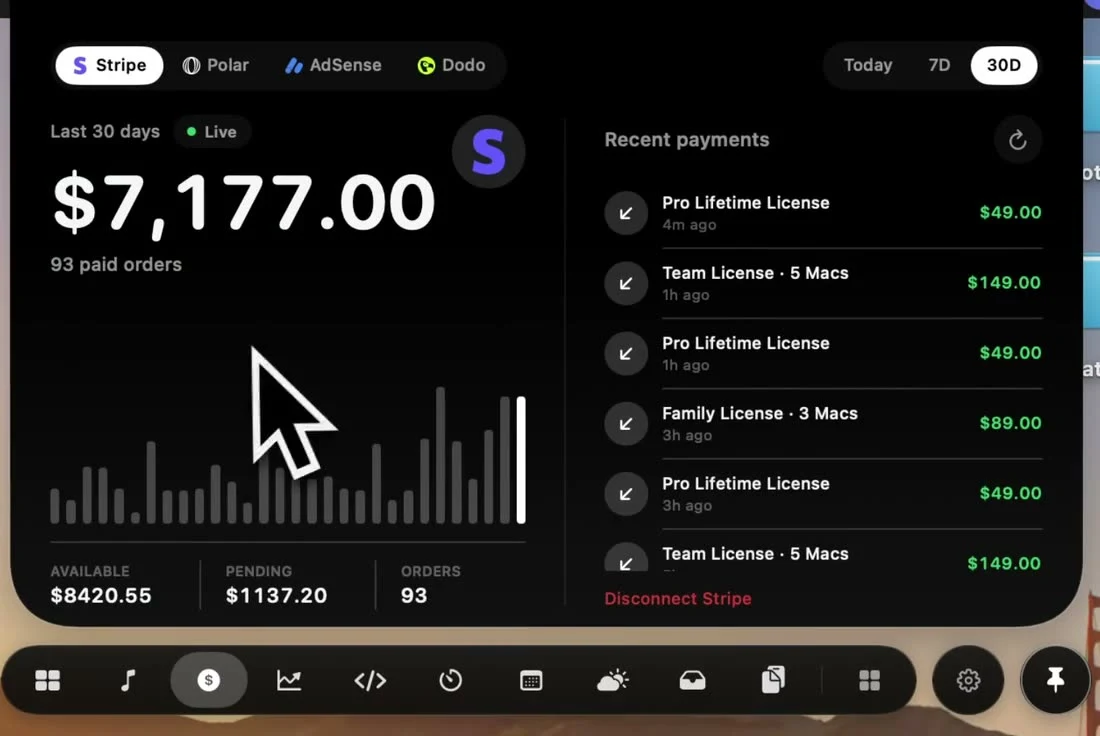
In NotchPop Revenue, choose Stripe and connect a restricted live API key with read access to Balance and Charges. Review the account, currency and freshness before using the dashboard. Available balance, pending balance and revenue describe different things and should be read separately.
Create access for a reading dashboard
Stripe supports restricted API keys so an integration can receive selected permissions. For NotchPop's connection, the form asks for a restricted live key and identifies Balance and Charges as the read permissions needed. Configure those permissions in the intended Stripe account instead of granting unrelated write access.
Enter the key in the app's connection form. Connected credentials are stored in your Mac's Keychain. Keep the value private when sharing your screen or reporting an error: an account label, permission description and redacted error are enough to discuss setup without publishing a usable credential.
Read each number in its own context
| Reading | Question it helps answer |
|---|---|
| Revenue and recent charges | What supported payment activity did the app fetch? |
| Available balance | What balance did Stripe report as available? |
| Pending balance | What balance did Stripe report as pending? |
| Last sync and error | How fresh and complete is this observation? |
The charge calculation accounts for refunded amounts in the supported data. That still does not make revenue interchangeable with a payout or account balance. A payment, a refund, a fee and money arriving in a bank account can appear in different reports and at different times.
Check the currency beside the amount. A total assembled from several providers needs currency conversion, whereas the Stripe provider view keeps its own account context. See the currency converter guide for the distinction between an indicative rate and a bank's actual conversion.
Resolve a failed sync before drawing conclusions
- Choose Stripe in Revenue and connect the restricted key.
- Confirm the account and read the available and pending balance labels.
- Refresh, then inspect the last-sync time and any provider error.
- Compare the relevant period and currency with the original Stripe Dashboard when investigating a discrepancy.
A permission error can leave the balance unreadable even when a key exists. Review the stated Balance and Charges permissions and the key's account before retrying. A failed connection is missing information, so do not present its placeholder as measured zero sales.
Use GA4 for website activity and Polar for its separate orders. Connecting one service does not grant access to the others or turn their readings into a reconciled accounting record.
Sources and editorial notes
Published by NotchPop, the maker of the app. macOS instructions and third-party claims are linked to the sources below. Settings and offers can change between versions. Read our editorial approach or send a correction.