
Files, one glance away
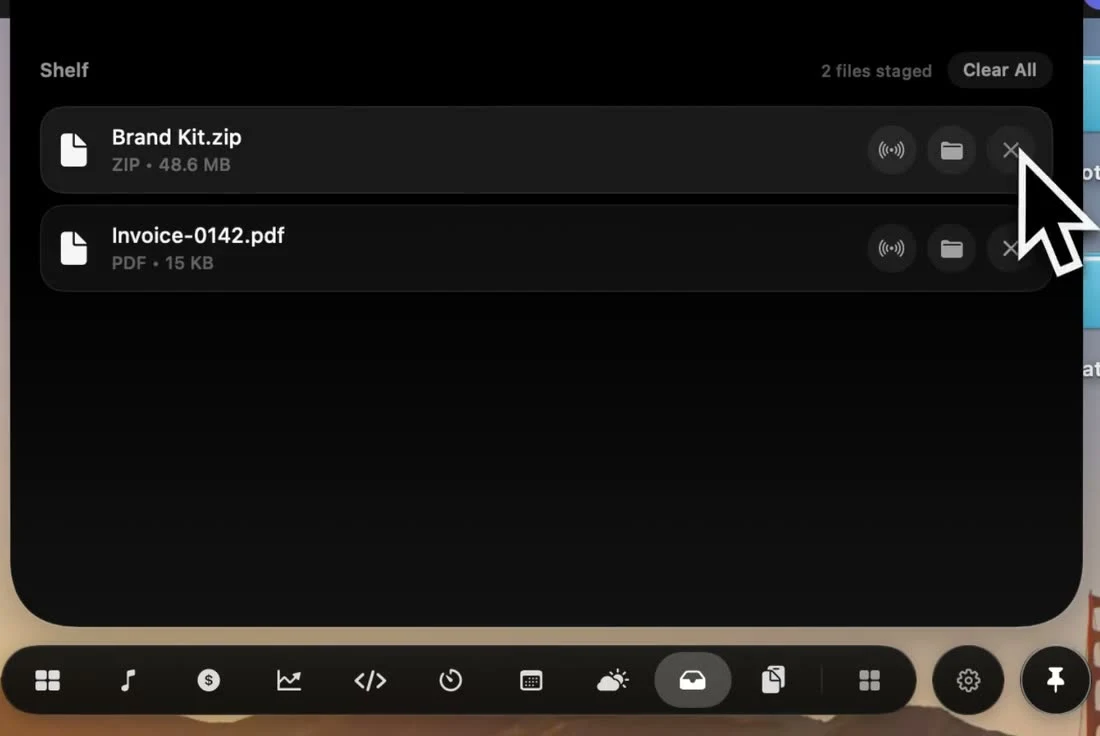
Moving a file between apps usually means juggling Finder windows. Drop Shelf gives it a temporary home in the notch, so it waits right where your eyes already are.
How it works
- 1
Drop it on the notch
Drag files onto the notch and pick Keep, Convert, AirDrop or Copy path.
- 2
Keep working
Switch apps, spaces and windows. Your files stay on the shelf, one glance away.
- 3
Send it on
Drag them out where they need to go, AirDrop them, or reveal the originals in Finder.
What you can do with a file
AirDrop
Send a file from the shelf to a nearby iPhone, iPad or Mac.
Reveal in Finder
Jump straight to where a file came from.
Image conversion
Turn JPEG, PNG, HEIC, TIFF or WebP images into JPEG, PNG, HEIC or PDF.
Copy path
Drop files on the notch to copy their full paths, one per line.
On-device
Conversion happens on your Mac. Files are never uploaded.
Drag back out
Drop a file from the shelf into any app that accepts it.
How other notch apps compare
From our Mac notch app comparison, reviewed September 23, 2026.
| App | File shelf / drag-drop tray | AirDrop quick send | Image conversion |
|---|---|---|---|
 NotchPop | Included | Included | Included |
 Droppy | Included | Included | Included |
 Alcove | Not listed in published features | Not listed in published features | Not listed in published features |
 NotchNook | Included | Included | Not listed in published features |
 The Boring Notch | Included | Included | Not listed in published features |
 Atoll (beta) | Included | Included | Limited support |
 DynamicLake Pro | Included | Included | Included |
 NotchBuddy | Included | Not listed in published features | Included |
 NotchFlow | Not listed in published features | Not listed in published features | Not listed in published features |
 Canopy | Included | Not listed in published features | Not listed in published features |
 Seam | Included | Included | Not listed in published features |
 NotchDrop | Included | Included | Not listed in published features |
 Perch | Included | Not listed in published features | Not listed in published features |
 MewNotch | Included | Not listed in published features | Not listed in published features |
Set it up on your Mac
Use a Mac file shelf to stage files between apps. Learn NotchPop's drag-and-drop, multi-select, AirDrop and local image conversion workflow.
More inside the island
Every tool below ships in the same app, for the same one-time price.
Frequently asked
questions
Competitor features reviewed September 23, 2026 from each app's own site, App Store listing or repository; see the sources. This is NotchPop's own comparison. Send a correction. Product names and trademarks belong to their respective owners.