
Now playing, always in view
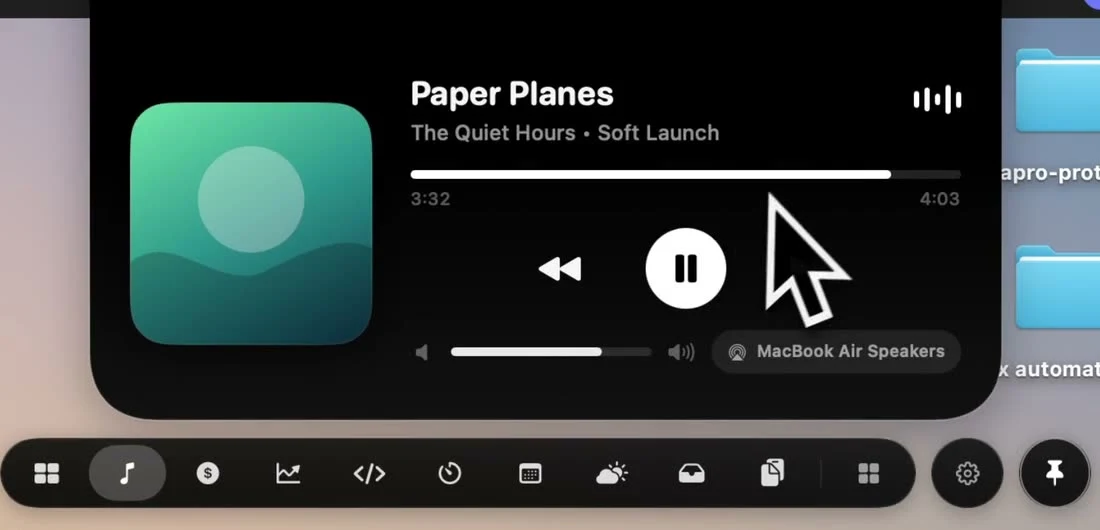
The notch sits where your eyes already are. Media Island puts the song, the artwork and the controls there, so you never go hunting for a player window.
How it works
- 1
Play anything
Start music in Apple Music, Spotify or a browser tab. NotchPop picks it up on its own.
- 2
Glance at the notch
The album art sits in the resting notch, so you can see what's playing without opening anything.
- 3
Open it to control
Open the island to play, pause, skip, change the volume or switch outputs.
What it does
Any app
Music, Spotify, a YouTube tab or a podcast app. If it's playing, the island shows it.
Live artwork
Album art, title and artist, with the island's colors picked from the artwork.
Play, pause, skip
Control playback from the notch, or with your keyboard's media keys.
Volume
Set Apple Music or Spotify volume with a slider in the island.
Audio outputs
Move sound to speakers, AirPods or an AirPlay device without opening System Settings.
Track progress
Elapsed and total time for the current track, at a glance.
How other notch apps compare
From our Mac notch app comparison, reviewed September 23, 2026.
| App | Now Playing controls | Audio output switcher |
|---|---|---|
 NotchPop | Included | Included |
 Droppy | Included | Not listed in published features |
 Alcove | Included | Not listed in published features |
 NotchNook | Included | Not listed in published features |
 The Boring Notch | Included | Not listed in published features |
 Atoll (beta) | Included | Not listed in published features |
 DynamicLake Pro | Included | Not listed in published features |
 NotchBuddy | Included | Not listed in published features |
 NotchFlow | Included | Not listed in published features |
 Canopy | Included | Not listed in published features |
 Seam | Included | Included |
 NotchDrop | Not listed in published features | Not listed in published features |
 Perch | Included | Not listed in published features |
 MewNotch | Included | Not listed in published features |
Set it up on your Mac
Set up Mac notch music controls for Spotify and Apple Music. See artwork, pause tracks and switch audio outputs with NotchPop's Media Island.
More inside the island
Every tool below ships in the same app, for the same one-time price.
Frequently asked
questions
Competitor features reviewed September 23, 2026 from each app's own site, App Store listing or repository; see the sources. This is NotchPop's own comparison. Send a correction. Product names and trademarks belong to their respective owners.