
Stop losing what you copied
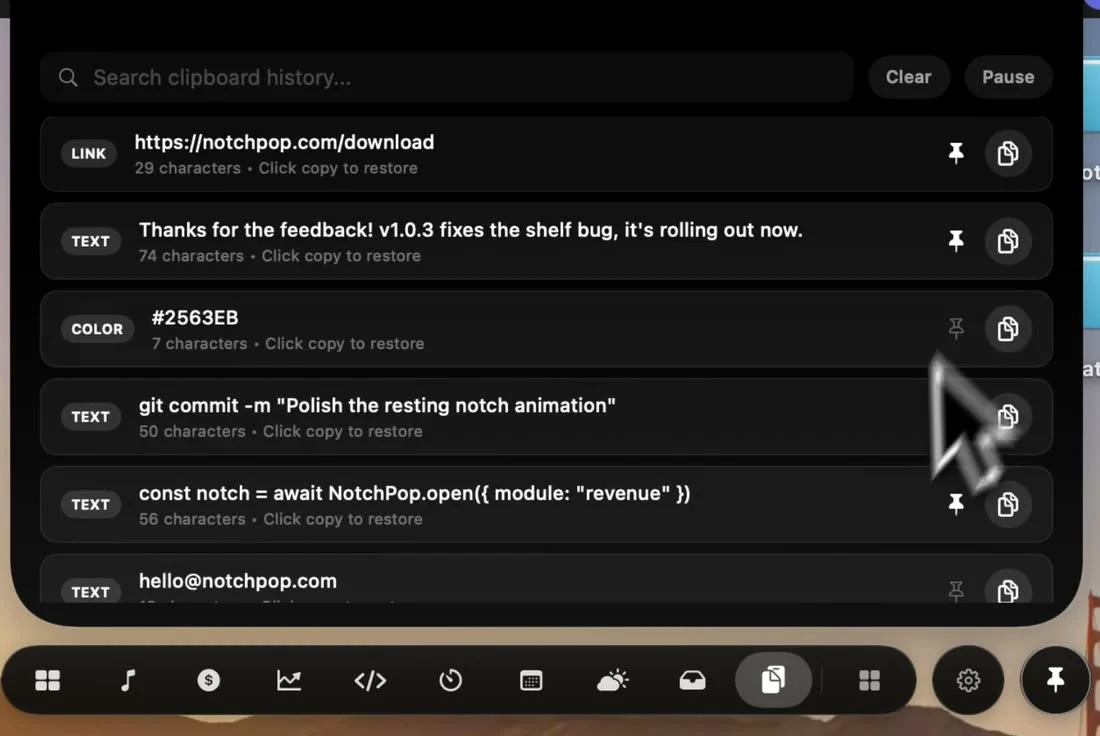
Copy something new and the last thing is gone. NotchPop keeps a short, searchable history in the notch, and it stays off until you turn it on.
How it works
- 1
Turn it on
Clipboard history is off by default. Enable monitoring once from the notch.
- 2
Copy as usual
Text, links, colors, code, files and images land in the history as you copy them.
- 3
Find and reuse
Search the history, copy an item back in one click, and pin the ones you'll need again.
What it does
Search
Type a few letters to filter everything you copied.
Smart types
Links, colors, code, files and images are recognized and labeled.
Pin
Pinned items stay put and survive a restart. Nothing else is saved.
One-click copy
Copy any item back, with a checkmark so you know it worked.
Skips secrets
Items that password managers mark as concealed or transient are ignored.
Pause or clear
Pause monitoring any time, or clear the history in one go.
How other notch apps compare
From our Mac notch app comparison, reviewed September 23, 2026.
| App | Clipboard manager | Clipboard search and pinned items |
|---|---|---|
 NotchPop | Included | Included |
 Droppy | Included | Included |
 Alcove | Not listed in published features | Not listed in published features |
 NotchNook | Not listed in published features | Not listed in published features |
 The Boring Notch | Not listed in published features | Not listed in published features |
 Atoll (beta) | Included | Included |
 DynamicLake Pro | Not listed in published features | Not listed in published features |
 NotchBuddy | Included | Included |
 NotchFlow | Not listed in published features | Not listed in published features |
 Canopy | Not listed in published features | Not listed in published features |
 Seam | Not listed in published features | Not listed in published features |
 NotchDrop | Not listed in published features | Not listed in published features |
 Perch | Included | Limited support |
 MewNotch | Not listed in published features | Not listed in published features |
Set up your clipboard workflow
See how monitoring, search, pins and keyboard shortcuts work, including the permissions needed for automatic paste.
Read the Mac clipboard history guideMore inside the island
Every tool below ships in the same app, for the same one-time price.
Frequently asked
questions
Competitor features reviewed September 23, 2026 from each app's own site, App Store listing or repository; see the sources. This is NotchPop's own comparison. Send a correction. Product names and trademarks belong to their respective owners.