
Time, without another app
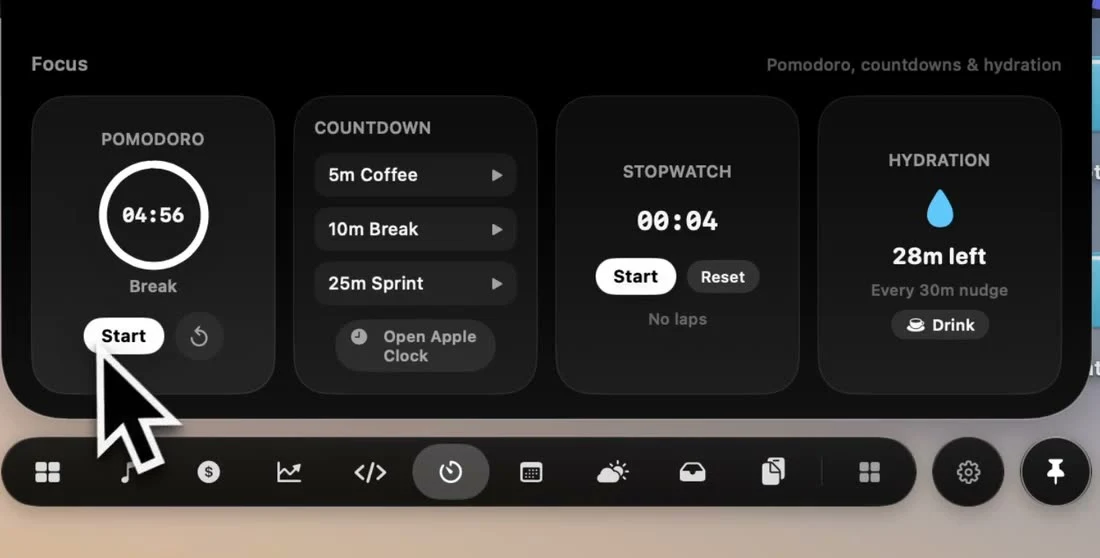
Start a focus session and keep working. The countdown stays in the notch, and it tells you when it's time for a break.
How it works
- 1
Start a session
Begin a 25-minute Pomodoro, or pick a 5, 10 or 25-minute countdown.
- 2
Keep working
The countdown stays visible in the notch while it's collapsed.
- 3
Take the break
The notch lets you know when a session ends, with a 5-minute break ready to start.
What's inside
Pomodoro
25 minutes of focus, then a 5-minute break, with a reset any time.
Countdowns
One-tap 5-minute coffee, 10-minute break and 25-minute sprint timers.
Stopwatch
Time anything, right from the notch.
Live countdown
See the time left while the notch is collapsed.
Session alerts
A notch alert when a focus session or break is over.
Hydration
A reminder every 30 minutes. Tap Drink to reset it.
How other notch apps compare
From our Mac notch app comparison, reviewed September 23, 2026.
| App | Focus timer / Pomodoro | Hydration reminders |
|---|---|---|
 NotchPop | Included | Included |
 Droppy | Included | Not listed in published features |
 Alcove | Not listed in published features | Not listed in published features |
 NotchNook | Included | Not listed in published features |
 The Boring Notch | Not listed in published features | Not listed in published features |
 Atoll (beta) | Included | Not listed in published features |
 DynamicLake Pro | Included | Not listed in published features |
 NotchBuddy | Included | Included |
 NotchFlow | Included | Not listed in published features |
 Canopy | Not listed in published features | Not listed in published features |
 Seam | Included | Not listed in published features |
 NotchDrop | Not listed in published features | Not listed in published features |
 Perch | Included | Not listed in published features |
 MewNotch | Not listed in published features | Not listed in published features |
Set it up on your Mac
Start a Pomodoro timer for Mac in NotchPop's notch. Learn focus and break controls, custom duration, quick countdowns, stopwatch and hydration reminders.
More inside the island
Every tool below ships in the same app, for the same one-time price.
Frequently asked
questions
Competitor features reviewed September 23, 2026 from each app's own site, App Store listing or repository; see the sources. This is NotchPop's own comparison. Send a correction. Product names and trademarks belong to their respective owners.