
Edited by Tejas Telkar · Published · Updated
Short answer
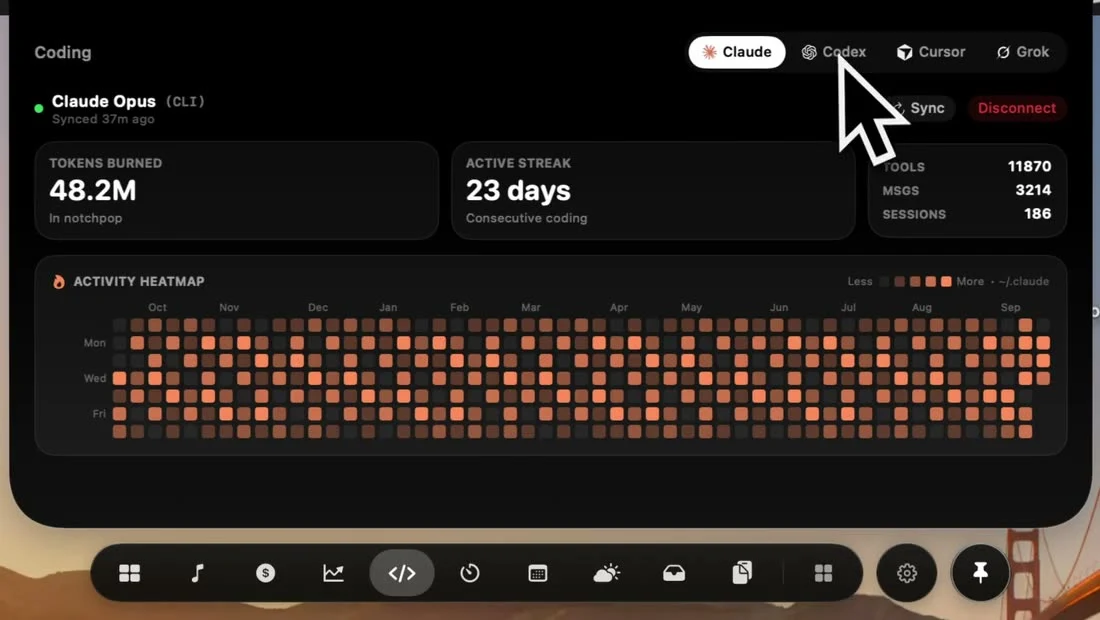
Run Claude Code on this Mac, then open NotchPop's Coding tool and connect the local CLI data when available. The app reads supported information under ~/.claude. An Anthropic API key provides connection status in this workflow; it does not unlock a fabricated complete usage history.
Begin with an actual local session
The activity view needs data to observe. Use your normal Claude Code setup on this Mac and complete an ordinary session before expecting historical activity. A fresh installation with no session files cannot supply a meaningful heatmap simply because a dashboard is open.
NotchPop identifies available local CLI data and offers a connection or reconnection action. If you previously disconnected it, reconnect deliberately. Keep the source clear: local activity observations, connection status and provider-reported plan limits are different kinds of information with different availability.
Connect and check freshness
- Open Coding in NotchPop and find the Claude Code connection.
- Use the local connection when supported data exists on this Mac.
- Inspect the mode and last-sync information.
- Compare an ordinary recent session with the displayed sessions, activity or heatmap before relying on the overview.
A displayed token count depends on the supported source data. A stale reading should not be described as current merely because it appears in a live-looking panel. Use Sync when appropriate and read any error. Avoid copying raw transcripts into public support messages; app versions and a redacted reproduction are usually more useful.
Understand the limits of a second dashboard
An API key being accepted proves a different fact from the app having permission to read an entire subscription's usage. The connection UI explicitly treats the API-key route as status-only. Do not interpret an absent limit or unavailable total as zero usage, and do not treat local token observations as an invoice.
The original provider remains the place for authoritative account and billing information. If you also use Codex, its local activity guide explains a separate source. For the server started by your project, use Dev servers; activity in an assistant does not prove a local preview is reachable.
Sources and editorial notes
Published by NotchPop, the maker of the app. macOS instructions and third-party claims are linked to the sources below. Settings and offers can change between versions. Read our editorial approach or send a correction.